Introduction: Why Push Notifications Matter for On-Demand Apps
Push notifications have revolutionized the way businesses interact with users, especially in the realm of on-demand apps. These bite-sized messages bridge the gap between apps and users by delivering timely, personalized updates directly to a user’s device. Whether it’s a reminder to book a service, a promotional offer, or an update about an ongoing order, push notifications are a powerful tool to grab user attention and drive engagement.
In the highly competitive on-demand app market, user engagement plays a critical role in determining an app’s success. With a plethora of apps vying for user attention, businesses need strategies that not only attract users but also retain and engage them. This is where push notifications shine. Unlike emails or social media posts, which users may miss, push notifications appear directly on the device screen, ensuring visibility.
For instance, imagine a user who frequently orders food delivery. A well-timed notification offering a 20% discount on their favorite cuisine during lunchtime can nudge them toward placing an order. Similarly, a ride-hailing app can use push notifications to inform users about peak-hour fares or promotional discounts, encouraging immediate bookings.
The role of push notifications in boosting on-demand app engagement is undeniable. When used effectively, they can reduce churn, increase retention, and significantly enhance the overall user experience. In this article, we’ll delve deeper into how push notifications benefit on-demand apps, explore various types, outline best practices, and provide strategies to maximize their effectiveness.
1. The Benefits of Push Notifications for On-Demand Apps
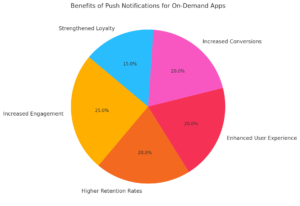
1.1 Increased User Engagement
Push notifications provide a direct way to communicate with users, fostering consistent interaction. This interaction is essential in the fast-paced world of on-demand apps, where users expect instant updates and valuable insights.
Examples of User Engagement:
- Reminders: Notifications that remind users about pending actions, such as completing a booking or ordering a service.
- Timely Updates: Inform users about order confirmations, estimated delivery times, or service availability.
Engaged users are more likely to explore additional features of the app, increasing overall usage and satisfaction.
1.2 Higher Retention Rates
User retention is a critical challenge for on-demand apps, with studies showing that 25% of users abandon an app after just one use. Push notifications combat this by consistently reminding users of the app’s value.
Retention Techniques with Notifications:
- Milestone Celebrations: Congratulate users on achievements like “10th ride completed!” in ride-hailing apps.
- Periodic Updates: Send fitness progress reports to re-engage users with fitness tracking apps.
By staying relevant and valuable, notifications ensure users remain engaged over the long term.
1.3 Enhanced User Experience
Push notifications improve the overall user experience by making the app feel more tailored and dynamic.
Key Features That Enhance User Experience:
- Behavior-Based Recommendations: For instance, a streaming app can recommend shows based on a user’s viewing history.
- Localized Offers: Food delivery apps can provide restaurant discounts based on user location.
When users feel that the app understands their needs, they are more likely to continue engaging with it.
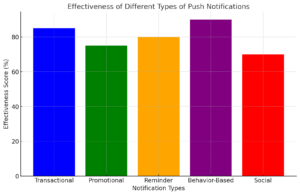
2. Types of Push Notifications and Their Use Cases
2.1 Transactional Notifications
Transactional notifications are critical for providing users with timely updates about their activities.
Examples of Transactional Notifications:
- Order Confirmations: Notifications that confirm a food delivery order and provide tracking details.
- Booking Updates: Ride-hailing apps notifying users about driver arrival times or ride completions.
These notifications build trust by keeping users informed at every step.
2.2 Promotional Notifications
Promotional notifications are geared toward encouraging user actions, such as making a purchase or exploring a new feature.
Examples of Promotional Notifications:
- Discount Codes: A delivery app offering “20% off your next order if placed within the next hour.”
- Exclusive Offers: Apps that notify users of time-sensitive promotions, such as “Flash Sale: 50% off all services for the next 2 hours.”
These notifications effectively drive conversions and boost app usage.
2.3 Reminder Notifications
Reminder notifications prompt users to complete pending tasks or actions.
Common Reminder Use Cases:
- Abandoned Cart Reminders: E-commerce apps urging users to complete purchases.
- Reorder Notifications: Food delivery apps reminding users about reordering their favorite meals.
2.4 Behavior-Based Notifications
Behavior-based notifications are personalized messages triggered by specific user actions or preferences.
Key Examples of Behavior-Based Notifications:
- Browsing History Alerts: Notifications about price drops for products viewed by the user.
- Inactivity Reminders: Messages like “We miss you! Here’s 15% off to get you back.”
2.5 Social Notifications
Social notifications cater to apps with a community aspect, keeping users updated on interactions.
Examples of Social Notifications:
- Notifications about likes, comments, or shares on user-generated content.
- Updates about group activities or events.
3. Best Practices for Effective Push Notification Campaigns
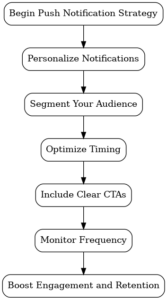
3.1 Personalization is Key
Personalized notifications significantly increase open and engagement rates compared to generic messages.
Examples of Personalization:
- “Hi Sarah, your favorite pizza is on discount today. Order now!”
- Notifications about special discounts based on previous orders.
3.2 Timing is Everything
Notifications sent at the wrong time can frustrate users, leading to app uninstalls. Use analytics to determine optimal times.
Timing Tips:
- Send fitness notifications in the morning to align with user routines.
- Offer food discounts during lunch or dinner hours.
3.3 Segment Your Audience
Segmenting users allows you to tailor notifications to specific groups based on their preferences or behaviors.
3.4 Use Engaging CTAs
Actionable language increases the likelihood of user interaction.
Examples:
- “Reserve your table now before spots fill up!”
- “Hurry! Get 20% off for the next hour.”
4. Measuring the Impact of Push Notifications
To truly understand the role of push notifications in boosting on-demand app engagement, it’s essential to measure their effectiveness. By tracking specific metrics, businesses can identify what works, what doesn’t, and how to refine their notification strategies.
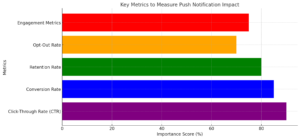
4.1 Click-Through Rate (CTR)
The CTR measures the percentage of users who click on a push notification after receiving it. A high CTR indicates that the notification was relevant and compelling.
How to Improve CTR:
- Personalize notifications with user names, preferences, or previous activity.
- Use emojis or engaging visuals in notifications to capture attention.
- A/B test different headlines, messages, or formats to identify the most effective approach.
Example:
- Notification: “Hi Sarah, your favorite burger is 15% off today! Order now 🍔.”
- Result: Higher CTR due to personalization and engaging content.
4.2 Conversion Rate
The conversion rate tracks how many users complete the desired action after interacting with a push notification. This could include placing an order, making a booking, or purchasing a subscription.
How to Boost Conversion Rates:
- Add urgency: “Limited-time offer—20% off ends in 1 hour!”
- Simplify the process: Include a direct link or deep link to the relevant action (e.g., checkout page).
Example:
- Notification: “Book your ride now and get 10% off. Offer valid until 6 PM.”
- Outcome: Increased bookings during the promotion period.
4.3 Retention Rate
The retention rate measures how effective notifications are in bringing users back to the app over a specific period. Regular and relevant notifications can significantly reduce churn.
Retention Strategies:
- Send re-engagement notifications: “It’s been a while! Reorder your favorite meal and enjoy free delivery.”
- Offer loyalty rewards: “Log in today to earn double points!”
4.4 Opt-Out Rate
The opt-out rate indicates how many users disable push notifications. A high opt-out rate suggests that notifications are either too frequent or irrelevant.
How to Reduce Opt-Out Rates:
- Respect user preferences: Allow users to customize notification types (e.g., order updates, promotions).
- Limit notification frequency: Focus on quality over quantity.
4.5 Engagement Metrics
Engagement metrics include app usage patterns after notifications are sent. These metrics help determine whether notifications encourage users to explore new features or return to the app.
Metrics to Track:
- Session duration: Are users spending more time on the app?
- Feature adoption: Are users exploring promoted features or services?
5. The Role of App Development in Push Notification Success
A well-executed push notification strategy requires a robust technical foundation. For on-demand apps, this means ensuring the app’s architecture can support advanced notification features like segmentation, personalization, and analytics.
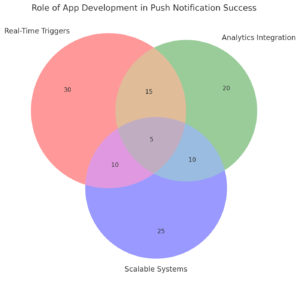
5.1 Real-Time Triggers
Notifications need to be sent immediately after specific user actions or external events. For example:
- A food delivery app sends a notification as soon as an order is confirmed or dispatched.
- A ride-hailing app informs users when their driver is nearby.
Benefits:
- Improves user experience by keeping users informed in real time.
- Enhances trust and reliability in the app’s services.
5.2 Customizable Notification Templates
Custom templates make it easy for marketing teams to create targeted campaigns without developer intervention. Features to include:
- Dynamic content fields (e.g., user names, location).
- Pre-built templates for common scenarios (e.g., abandoned carts, promotions).
5.3 Advanced Analytics Integration
To refine notification strategies, apps must track and analyze user behavior. Integration with analytics tools provides insights into:
- The effectiveness of different notification types.
- User preferences and engagement trends.
Example:
A fitness app tracks which types of notifications (e.g., workout reminders, milestone celebrations) result in the highest re-engagement rates.
5.4 Multi-Language Support
For apps with a diverse user base, multi-language notifications ensure inclusivity and personalization. For instance:
- A food delivery app could send notifications in English, Arabic, or Hindi, depending on the user’s preferences.
5.5 Scalable Notification Systems
As the user base grows, the app must handle an increasing volume of notifications without delays or failures. Scalable architecture ensures consistent performance even during peak usage.
Example:
During a flash sale, an e-commerce app might send millions of notifications simultaneously. A scalable system ensures timely delivery to all users.
Conclusion: Push Notifications as a Pillar of Engagement
The role of push notifications in boosting on-demand app engagement is both critical and multi-dimensional. By delivering timely, personalized messages, businesses can drive user engagement, improve retention, and enhance the overall app experience. However, the success of these campaigns depends on striking the right balance between relevance, timing, and frequency.
Investing in robust app development ensures that your app is equipped with the tools and features necessary for effective notification campaigns. By combining technical excellence with a user-centric strategy, businesses can harness the full potential of push notifications to achieve long-term success.
Looking to enhance engagement for your on-demand app? Partner with us for expert app development services that integrate cutting-edge push notification systems. Contact us today for a free consultation!